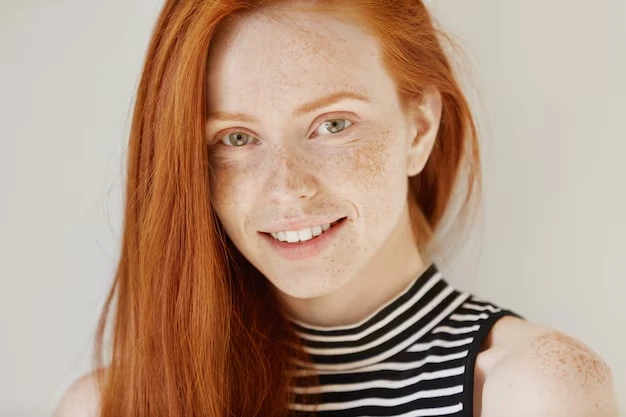
Adding freckles can instantly make your face feel softer and more approachable. But creating that perfect sun-kissed effect isn’t just about sprinkling dots – it’s about placement, balance, and subtlety. If you want a natural glow that looks effortlessly charming, this guide will show you how.
For digital touch-ups, RetouchMe Video and Photo Editor is a fantastic tool. Change skin color in the online photo editor app giving realistic results without making them look artificial. The app combines professional-quality design with intuitive controls, so you can experiment with different styles until you achieve a flattering sun-kissed look.
How to Make Freckles Look Natural
The secret to freckles that feel genuine is subtlety. Too many can make them appear fake, while too few might be barely noticeable. Here’s a practical approach that really works:
- Focus on the areas where sunlight naturally hits the face, mainly the nose and cheeks, but don’t ignore the forehead or temples if you want a more cohesive, sun-kissed effect. Placing freckles only in one spot can make them look staged, while gentle distribution across high points of your face creates a natural, radiant finish.
- Layer freckles of various sizes and shapes instead of using identical dots, which can feel artificial. By varying the density and pattern, you mimic how real freckles scatter unevenly, giving a more dynamic and realistic appearance.
- Blend edges softly so freckles merge seamlessly with your skin, avoiding harsh lines that immediately give away digital enhancement. Subtle fading around the outer freckles ensures they appear naturally integrated rather than painted on.
- Enhance the look with a soft glow using makeup or digital touch-ups: apply a light bronzer on areas like the forehead, cheekbones, and bridge of the nose to mimic sunlight, and add just a hint of highlighter on top of the cheeks and nose tip to create dimension that makes freckles appear luminous rather than flat.
- Tie the look together with warm-toned blush, applying it lightly to complement the freckles and give your skin a healthy, youthful flush. This adds depth and balance so the freckles feel like a natural feature rather than an added decoration.
Even light freckles can warm up your face dramatically. RetouchMe simplifies this process with templates and personalized adjustments that ensure your freckles enhance your features without looking overdone.

Using RetouchMe for Freckle Magic
Adding freckles digitally is quick and effective with RetouchMe. First, open the app and select a photo where you want to apply freckles. Next, tap the “Makeup” category and choose “Add Freckles.” You’ll find 18 different templates to explore, letting you pick the style that fits your desired look. The app allows adjustments to size, density, and placement to match your facial features perfectly. Once satisfied, submit your request and receive a professionally polished result in minutes.